
Short answer
Most businesses asking this need a fast website. An app earns its place when the same people use it often and the job needs what a phone does well: the camera, notifications, or working without signal. If your customers will visit once or twice, nobody installs an app for that, and a website is the right answer.

In this post: 10 sections
- Do I need an app for my business? Start with the job, not the platform
- What a phone does that a website can't
- App, installable web app or website: what each one is good at
- Start with a web app, decide with real numbers
- What the wrong choice costs you
- The chores that come with a store app
- How to find out for yourself this week
- What a good answer looks like
- When an app isn't worth buying
- The question to answer before any quote
The short version
- People install an app for something they do often, not for a business they visit once.
- The deciding question is the job: camera, notifications or working without signal point to an app.
- An installable web app sits in between, and it's often enough.
- An app is a second product to look after, on top of the website you'll still need.
- Whichever you build, screens people understand without being taught matter more than the platform.
Say a supplier's rep is at your desk on a Thursday afternoon with a tablet, showing you the app their other customers use to reorder. Your own website was built two years ago. It works, mostly. By the time the rep leaves, you're wondering whether you've fallen behind.
So you ask someone for a quote for an app. It comes back with a timeline in months and a number that makes you turn the page face down. Nobody in that conversation asked what the app would do that your website can't.
That's the whole problem. The question gets asked as "app or no app" when it should be "which job, for whom, and how often".
Do I need an app for my business? Start with the job, not the platform#
"We need an app" is sometimes exactly right and sometimes an expensive wrong turn. Some jobs truly need a phone's camera, notifications and offline use. Others are a website that would have done the same for far less, and nobody told you.
The difference comes down to the path a person takes to use each one. A website asks for one thing: a tap on a link. An app asks for a lot more. Find it in the store. Download it. Give it space on the phone. Allow its permissions. Sign in. Remember it exists next week. Every one of those steps loses people who were only mildly interested.
So an app only pays for itself when the person on the other end has a reason to come back again and again. A customer who books with you once a year won't go through all that. A member of your own team who fills in a job sheet five times a day will, happily, because the app saves them time every single time.
It helps to split the people into two groups before anything else:
- Your customers. Most of them meet you rarely. A first visit, a booking, a question about opening hours. For them, the fastest path is a link that opens instantly on whatever phone they have.
- Your own team, or a small group of regulars. They use the same tool daily or weekly, often away from a desk. For them, an app that remembers who they are, works in a basement with no signal and pings them when something needs doing can be worth the install.
Most "we need an app" conversations are really about the first group, and that's where an app is least likely to earn its keep.
What a phone does that a website can't#
Websites can do far more on a phone than they used to. They can use the camera through the browser, remember a login, take payments and work on any screen size. What's left for a proper app is narrower than most quotes suggest:
- Reliable notifications. A reminder that has to arrive at the right moment, every time, on every phone. Websites can send some notifications now, but support varies by phone and browser, and people often refuse them.
- Working without signal for long stretches. A field team in a basement, a warehouse or a village with patchy coverage needs to keep working and sync later. A website can do some of this, but an app does it more dependably.
- Deep use of the phone's hardware. Scanning many barcodes in a row, using location in the background, Bluetooth with a device on site.
- Being on the home screen for people who open it daily. Not for the odd visit, but for the tool someone reaches for every morning.
If none of those four is on your list, an app is unlikely to give your customers anything the website can't.
App, installable web app or website: what each one is good at#
There's a middle option most quotes don't mention: an installable web app. It's a website that can sit on the phone's home screen like an app, open full screen and keep working for a while without signal, all without going through an app store. For a lot of businesses it covers what they actually wanted from "an app".
| Website | Installable web app | App from the store |
|---|---|---|
| Opens from a link, no install | Opens from a link, can be added to the home screen | Has to be found and downloaded first |
| Best for customers who visit now and then | Best for regulars who come back weekly | Best for people who use it daily |
| Works offline only in limited ways | Can keep working for a while without signal | Built to work without signal and sync later |
| One thing to build and look after | Still one thing, with an app-like layer | A second product beside the website you still need |
| Changes go live the moment you publish | Changes go live the moment you publish | Changes go through store review before people see them |
A real example of the middle ground: DuctForge, our free HVAC takeoff calculator, runs entirely in the browser. There's no account and nothing to install, and a takeoff is saved on the device you started it on. For estimators who need it on a laptop or a phone at short notice, a link that just opens beats an app they'd have to install first.
Start with a web app, decide with real numbers#
If you're torn, there's a cheaper way to settle it than arguing in a meeting: build the installable web app first and watch what people do with it.
It's the website you needed anyway, with an app-like layer on top. Give it a couple of months and look at behaviour, not guesses. How many people added it to their home screen? How many came back the next week, and the week after? Which of the three actions did they use, and where did they give up?
If a dozen shopkeepers open it every Monday to reorder and nobody complains, you have your answer, and you didn't pay for a second product. If your field team keeps losing work in a basement with no signal, or the reminders aren't arriving when they should, that's real evidence for a store app. The brief also writes itself, because you now know exactly which jobs the app has to do better than the website did.
Either way the website stays. And if a store app does come later, it's built from what people actually did, not from what someone guessed before anything existed.
What the wrong choice costs you#
We won't tell you what an app costs, because the honest answer depends on what it has to do. You can work out whether one is worth it for you with three numbers of your own.
Write down how many different people would open it in a month. Then how many times each of them would open it in that month. Then what they would do in it that they can't do on your website today.
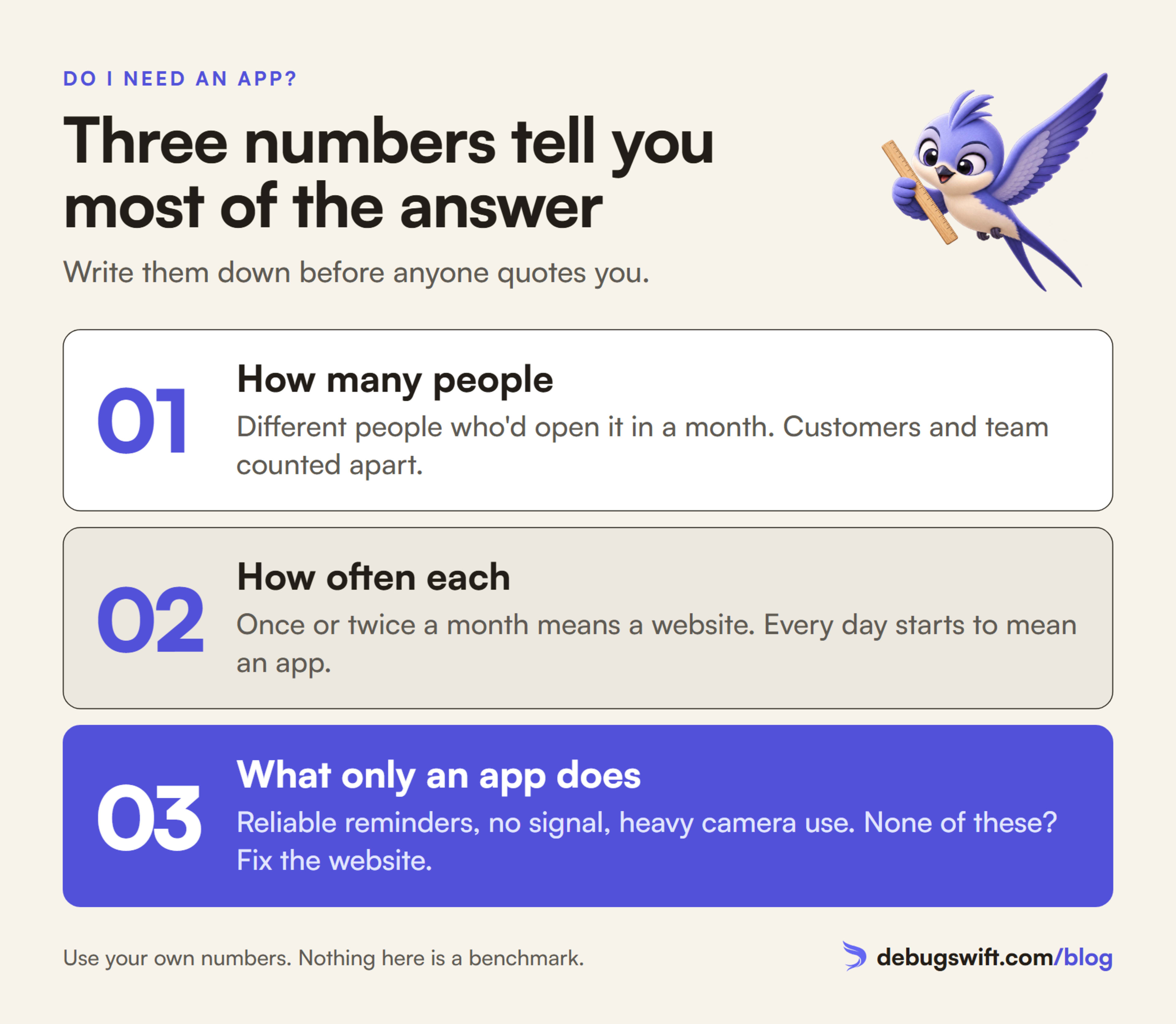
If the second number is one or two, stop there. People will visit once or twice, nobody installs an app for that, and a fast website is the right answer.
If the third answer is "nothing", you'd be paying to build and look after two things, the app and the website you'd still need, so that people can do the same thing in a different place. That money is better spent making the website fast and easy on a phone.
If the numbers are high and the third answer names something real, such as photos taken on site or a reminder that has to arrive at the right moment, you've found a job an app does well.
Say you have a field team of six who each fill in four job sheets a day. That's six people times four sheets times the working days in your month: your own figure, not ours. Now put a time next to it. If retyping each paper sheet at the office takes ten minutes, multiply that too. That is the time an app could hand back every month, and it's the number to hold against any quote.
The chores that come with a store app#
"Someone has to look after it" sounds vague until you list what the two stores actually ask of you. All of this comes on top of the build:
- Two developer accounts, in your name. Apple's developer programme costs $99 a year. Google Play has a one-time $25 registration fee. Small money, but the Apple one comes round every year for as long as you want the app on the store.
- A review before every release. Apple says every app on its store "is reviewed by experts", and each new version you send goes through that review before anyone can download it. A website fix goes live when you press publish. An app fix waits its turn.
- Privacy forms you have to keep true. Apple asks for your app's privacy practices, including those of any third-party code inside it, and says you're responsible for keeping the answers "accurate and up to date". Google's Data safety form says responses "must remain accurate and complete at all times". Add an analytics tool next year and the forms have to change with it.
- A yearly catch-up with Android. Google sets the minimum Android version apps must be built for. From 31 August 2026, new apps and updates have to target Android 16. Existing apps need to target Android 15 or higher to stay available to new users on newer phones. Leave an app alone for a couple of years and new customers simply stop finding it on Play.
None of this is hard for someone who does it every week. It is a standing job, though, so decide who does it before the app is built, rather than when Apple's first rejection lands in your inbox.
How to find out for yourself this week#
You can answer most of this without spending anything. Set aside an hour.
Check whether your business needs an app
- 01
List the three things someone would do in the app
Write them as plain actions: reorder stock, fill in a job sheet, check a booking. If you can't name three, that's an answer in itself.
- 02
Mark which ones need the phone itself
Reliable notifications, working without signal, or heavy use of the camera or other hardware. Put a tick beside each action that needs one of these.
- 03
Count how often the same person would do each one
Per month, honestly. Once or twice points to a website. Every day points to an app.
- 04
Try those three things on your own website, on your own phone
Use your mobile data, not the office Wi-Fi. Note every place you get stuck, wait, or have to pinch and zoom.
- 05
Run a free check on the page people land on
Our Website Audit runs 42 checks on one page, including speed and how it works on a phone, and lists every fix on screen. No signup.
- 06
Decide which problem you actually have
If nothing needs the phone's hardware and nobody comes back weekly, fix the website first. If the ticks and the counts are high, an app is worth pricing.
The free check is here: Website Audit. It tells you what's slow or awkward on the page that matters most, and most of what it finds is cheaper to fix than any app is to build.
What a good answer looks like#
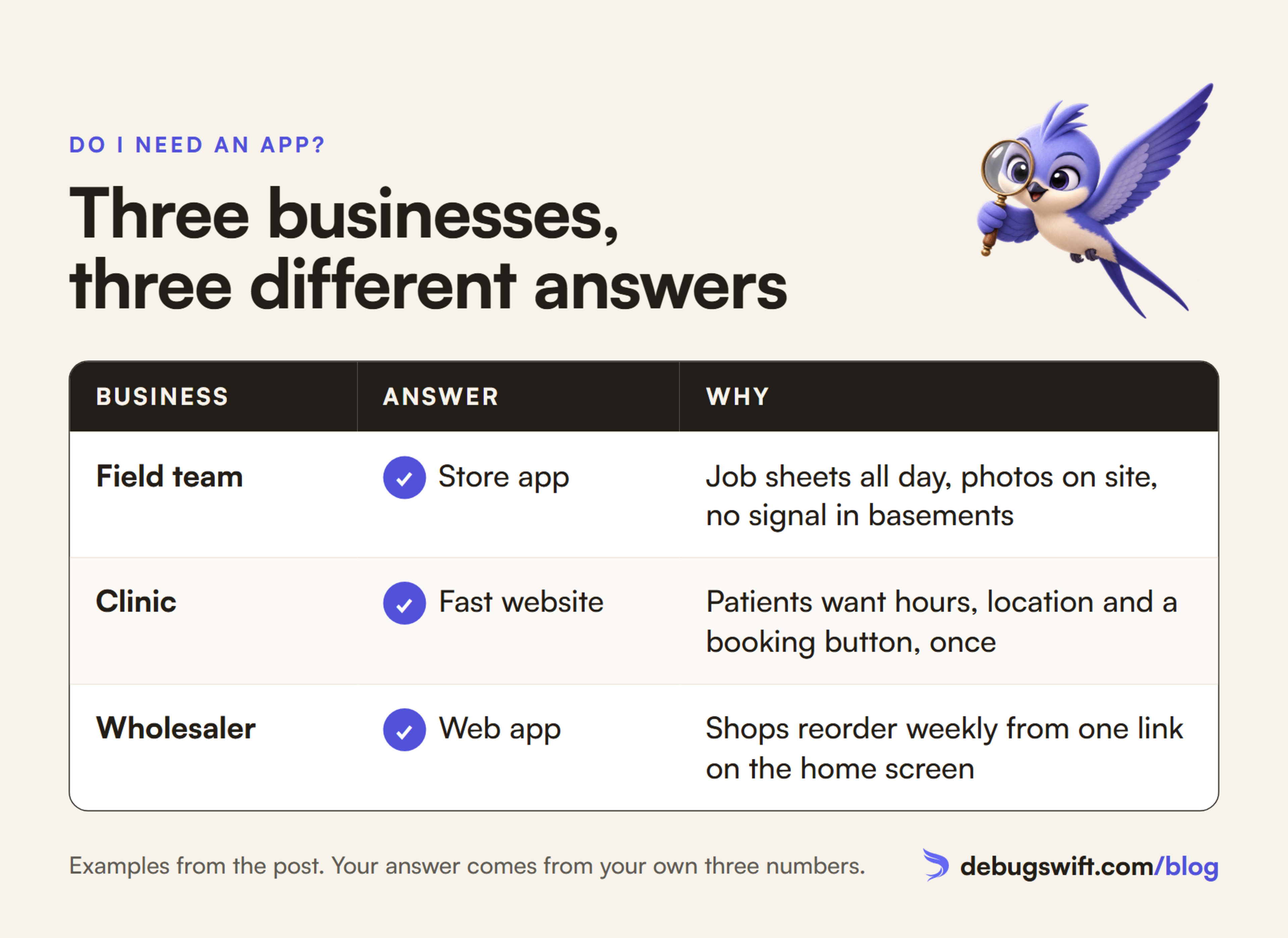
Say your field team fills in paper job sheets and photographs them at the end of the day. An app lets them complete the sheet on site, take the photo in place and keep working without signal. It syncs when they're back in range, and the office sees the job the same day instead of the next morning. That is an app earning its place: frequent use, the camera, and no signal on site.
Now say you run a clinic and patients look you up before a first visit. They want your hours, where you are and how to book. That's a fast website with a clear booking button, and an app would only get in their way.
And say you run a wholesale business where a few dozen shops reorder from you every week. That's the case for an installable web app: one link the shopkeepers add to their home screen, no store, no download, and you change the product list whenever you like.
Whichever one you build, the screens decide whether people use it. When software is hard to use, the support calls, abandoned forms and retraining all cost money, and nobody ever files that under design. Changing a screen in a drawing takes minutes. Changing it after it's built takes days, which is why a clickable prototype comes before the build.
If it does turn out to be an app, insist on a few things before anyone starts:
- It's published under your own store accounts, so the app stays yours whatever happens with the people who built it.
- One app covers both iPhone and Android, tested on real phones rather than only in a simulator.
- Offline use and notifications are built only where the job needs them, not added because they're on a feature list.
- You get the code, documented in plain language, and you know who keeps it working when phones update.
- You've clicked through a prototype of the main screens before a line of code is written.
When an app isn't worth buying#
If people will visit once or twice, don't build one. A fast website is the right answer, and we'd say so.
If your website is slow or confusing on a phone, an app won't fix that. It moves the same confusion into a store download. Fix the website first and see what's left.
If the reason is that a competitor has one, wait. Ask their customers whether they use it.
If what you really want is for things to look more polished, while how they work isn't the problem, a brand refresh might serve you better than either.
And if you can't name who would keep the app working next year, when phones update and the store changes its rules, hold off until you can. Left alone, an app breaks a little more with every phone update, and your customers notice before you do, in the store reviews.
The question to answer before any quote#
Which three things would someone do in your app, and how many times a month would the same person do them? If you can answer that quickly, you already know most of the answer.
A second pair of eyes helps here: book a free call.
Still wondering
Do we need separate apps for iPhone and Android?
Usually no. One codebase can cover both, which keeps the build and every later change cheaper.
Whose name is the app published under?
Yours. The store accounts are registered to you, so the app stays yours whatever happens with us.
What is an installable web app?
A website that can be added to a phone's home screen and open like an app, without an app store. It suits regular users who come back weekly.
Will an app help my business show up on Google?
Not on its own. People find businesses through websites and Google Business Profiles. An app helps the people who already know you.
Should I fix my website before building an app?
Yes, if it's slow or awkward on a phone. Most customers will meet you there first, and an app won't change that.
Sources
- web.dev: What are Progressive Web Apps?
- MDN Web Docs: Progressive web apps
- Apple Developer Program (membership fee)
- Apple: App Review Guidelines
- Apple: App privacy details on the App Store
- Play Console Help: Register for a Google Play developer account
- Play Console Help: Target API level requirements
- Play Console Help: Data safety section